We have just started to reorganize some of our shelving and want to change our BIN location design.
Background:
-
we do not currently use Warehouse Control https://forum.evoerp.com/t/warehouse-control/1145
-
all our items only have 1 Bin location and we would like to keep it that way.
-
we only have one warehouse and are just using the DEFAULT location.
I know we can go to each item and update its Bin but is there an EVO/DBA tool available to allow us to update all items assigned to one Bin location to another, for example change all items assigned to BIN R01 to A1?
I found this in https://forum.evoerp.com/t/in-l-j-transfer-inventory/664 IN-L-J Transfer Inventory that sounds like it would work because it states Use this program to transfer inventory from one Location (factory or warehouse) to another or from one Bin to another in the same warehouse. But it looks like I have to use it on a part by part basis and not all items in a BIN location…it will also not let me enter the same FROM & TO location
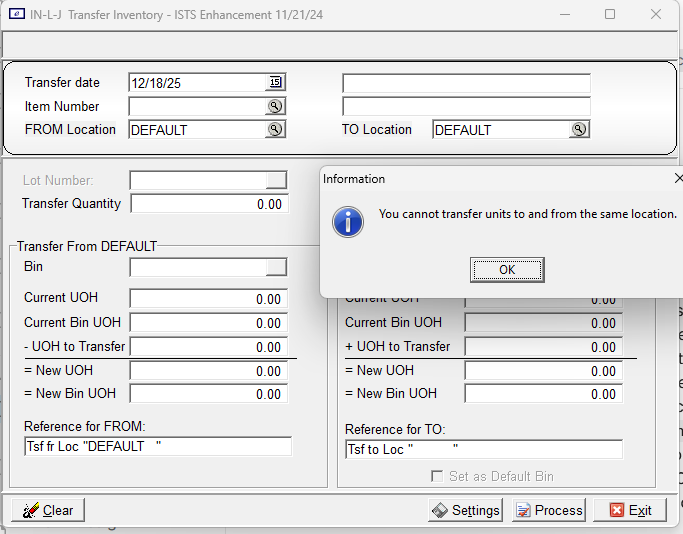
I then found the section on Warehouse control https://forum.evoerp.com/t/wc-a-enter-warehouse-bin-locations/758 WC-A Enter Warehouse Bin Locations Editing a record To edit an existing Bin Location, click EDIT and enter the desired changes and click Save or press F10. This also sounds like it might work but I need to ensure that I fully understand if there are any unexpected impacts of enabling this feature as well how to setup correctly. First does anyone know if this will allow me to update all items assigned to BIN R01 to A1…meaning if I click Edit and just change the Bin name from R01 to A1 if all the items are updated?
If so, then how do I setup correctly …When I access the settings I see
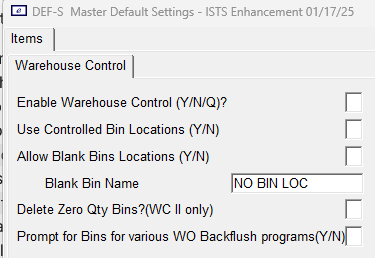
https://forum.evoerp.com/t/warehouse-control/1145 Warehouse Control Overview
here are 3 settings relating to Warehouse Control in on the Warehouse Control Defaults screen.
-
First is the master setting to enable or disable the Warehouse Control module which allows for multiple bins or shelves per item**. N means only 1 Bin per item is allowed**. Y means multiple bins are tracked as possible locations but on-hand quantity by Bin is not maintained. Q means quantity by Bin is maintained.
-
Use Controlled Bin Locations determines whether a master list of Bin/Shelf Locations must be adhered to or if users can create new ones on the fly
-
Allow Blank Bin Locations controls whether an item coded for Warehouse Control can be assigned to a “Blank” Bin or Shelf or if all Bin and Shelf Locations must be named
Since I only want 1 Bin location per item to be allowed then it sounds like I want to set Enable Warehouse Control to N based upon the above wording. But then it forces the other options to the following and I cannot update any of them.
Is this correct?
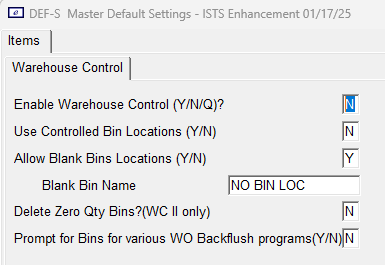
Are there any other concerns that I should be aware of if I enable?
Thanks in advance
Jeff Ham
RTC Manufacturing, Inc.